
Download Active@ ISO Manager – CD/DVD ISO Image Creator, Editor, Burner
Overview
Active@ ISO Manager is a dedicated utility designed for users who need to create, edit, and burn ISO images for CD and DVD media. Built to support the ISO 9660 and Joliet standards, the application ensures broad compatibility across operating systems and optical drives. Its primary purpose is to simplify the management of disc image files—whether for digital archiving, software distribution, or backup purposes. The app targets users who work with legacy media formats, IT professionals, system administrators, and individuals managing large collections of disc-based software or data.
By enabling the creation of ISO images from physical media or selected files and folders, Active@ ISO Manager streamlines the transition from physical discs to digital storage. It also allows users to modify existing ISO files, making it ideal for customizing installation discs or updating archived content. The ability to extract files directly from ISO images adds another layer of convenience, eliminating the need to burn entire discs just to access a few files.
While the developer did not provide additional technical details about the company or its background, the app’s consistent release pattern and feature set suggest a focus on reliability and precision. The software plays a valuable role in the ecosystem of digital preservation tools, offering a lightweight yet functional solution for managing optical disc images on modern systems. For users still relying on ISO-based workflows, this app provides a dependable, no-frills alternative to more complex disc-authoring suites.
Key Features & Functionality
- ISO Image Creation: Users can generate ISO images from physical CD/DVD-ROMs or from any selected group of files and folders. This feature supports digital archiving of software, backups, or multimedia content, ensuring long-term accessibility.
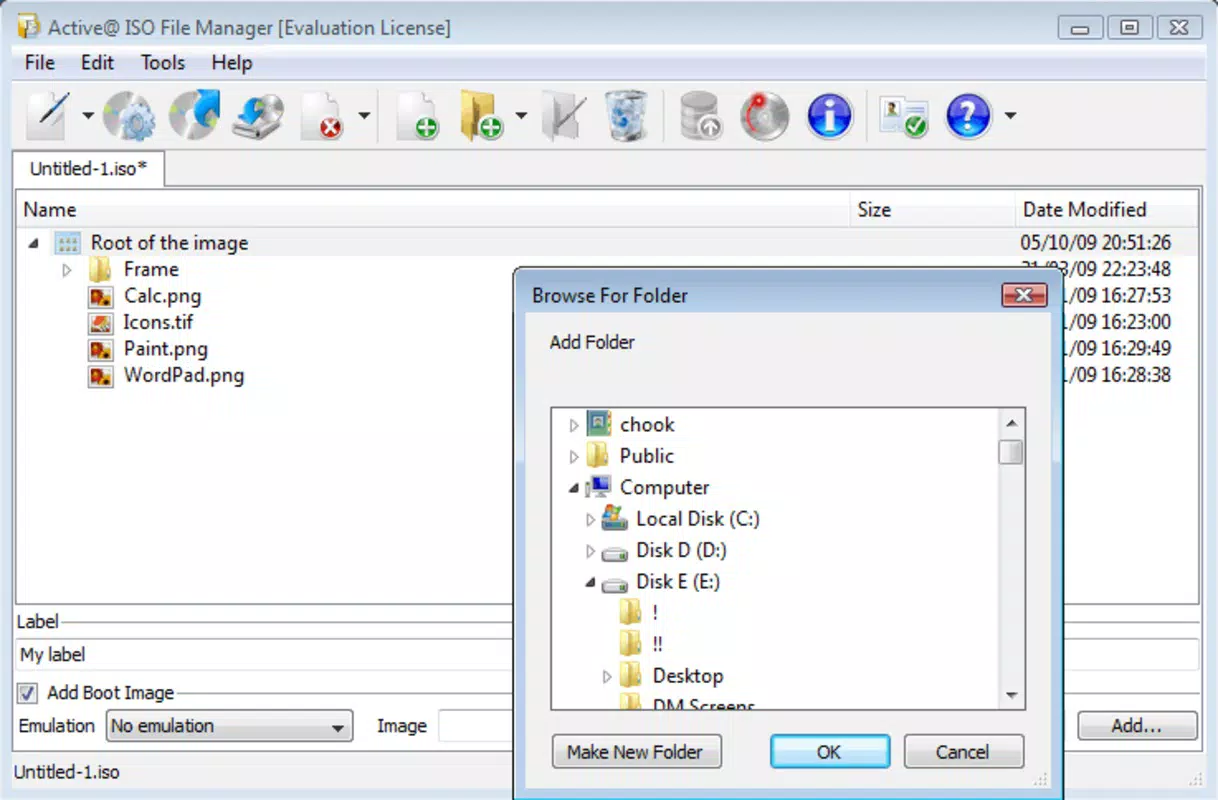
- Editing Capabilities: Existing ISO files can be modified by adding or removing files and directories. This functionality is particularly useful for customizing bootable images or updating outdated software distributions.
- File Extraction: Users can extract individual files or entire folders from ISO images without burning them to physical media. This speeds up access to content and reduces wear on optical drives.
- Automated Settings: The application remembers user preferences and settings across sessions, reducing repetitive configuration and improving workflow efficiency for regular users.
- Command Line Support: Advanced users can leverage command line parameters to automate ISO creation, editing, and burning tasks. This is ideal for scripting workflows, batch processing, or integration into larger system management tools.
For example, a system administrator might use the command line to automate the creation of a monthly backup ISO from a network share. A student could extract a single executable from an ISO image to run a legacy program without installing the full disc. These real-world applications highlight the software’s practicality and adaptability across different user profiles.
Interface, UX & Performance
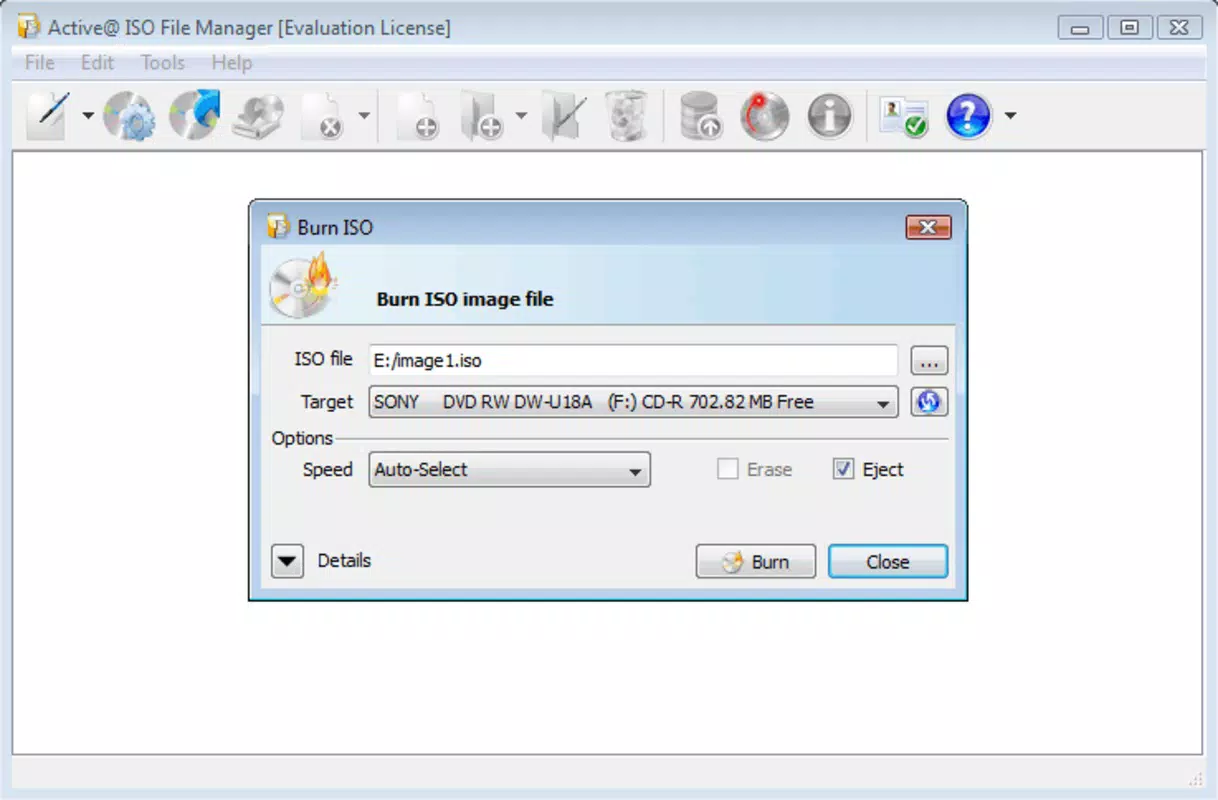
The user interface of Active@ ISO Manager is designed with simplicity and functionality in mind. It features a clean, straightforward layout that organizes core operations—create, edit, extract, and burn—into clearly labeled sections. Navigation is intuitive, allowing users to switch between tasks with minimal effort, even without prior experience.
Visual elements are minimal but effective, focusing on usability rather than decorative design. Menus and toolbars are logically grouped, and common actions are accessible via both mouse and keyboard shortcuts. The application responds promptly to user input, with no noticeable lag during image creation or file extraction processes.
Although the developer did not list formal performance metrics, the app demonstrates stable behavior across various device categories. It operates efficiently without excessive memory or CPU usage, making it suitable for older systems or environments with limited resources. The interface remains responsive even when handling large ISO files, suggesting optimized file handling routines.
Platform Compatibility & Technical Requirements
Active@ ISO Manager is available for Windows-based systems. The app supports modern Windows operating systems, though specific version requirements were not listed. The file size is approximately 2.1 MB, indicating a lightweight footprint suitable for quick installation and minimal storage impact.
Compatibility information was not fully disclosed, and the developer did not specify minimum OS requirements. Users should verify system compatibility with their current Windows environment before installation. The application does not appear to require additional runtime libraries or drivers, which simplifies deployment.
Pros and Cons
Pros
- Lightweight and fast, with minimal system resource usage.
- Supports ISO 9660 and Joliet standards for broad compatibility.
- Offers both GUI and command-line interfaces for flexible use.
- Efficient file extraction and editing without full disc burning.
- Remembers user settings for faster future sessions.
Cons
- Platform availability was not specified beyond Windows.
- Developer did not provide detailed system requirements.
- Interface is functional but lacks modern visual enhancements.
- No built-in preview or validation tools for ISO integrity.
- Limited documentation or tutorial resources were noted.
FAQ
Is Active@ ISO Manager free to download?
The app’s pricing information was not provided. Users should verify the official source for current licensing and cost details.
Can I use Active@ ISO Manager on macOS or Linux?
Based on available information, the application is designed for Windows. No official support for macOS or Linux was mentioned.
Does Active@ ISO Manager support burning ISO images to physical discs?
Yes, the app includes functionality to burn ISO images to CD/DVD media, as part of its core feature set.
Is command line support available for automation?
Yes, the software supports command line parameters, allowing advanced users to automate tasks like ISO creation and burning.
How secure is the software for downloading and using?
As with any software, users should download from official or trusted sources. The developer did not provide details on security certifications or scanning history.
Final Thoughts
Active@ ISO Manager delivers a focused, reliable solution for users managing ISO image files. Its core features—creation, editing, extraction, and burning—are well-executed and accessible to both casual users and advanced technical professionals. While the interface lacks modern polish and documentation is limited, the app’s efficiency, lightweight design, and automation support make it a strong contender in the niche of disc image utilities.
It is especially beneficial for IT personnel, educators, and anyone maintaining legacy software archives. For those seeking a dependable tool to handle ISO files without the bloat of full-featured disc authoring suites, Active@ ISO Manager offers a streamlined, effective experience.
Download Active@ ISO Manager now


